USE CASES

The same platform, shaped to how your business sells

Broadcasts, an AI assistant and a shared inbox look different in a D2C store than in a clinic. These are the flows businesses set up first.

🛍

D2C & online retail

Recover carts, confirm COD orders, send shipping updates and bring repeat buyers back with segment-targeted offers.

FLOWS TO START WITH
Abandoned cart reminder
COD order confirmation
Shipping & delivery updates
Win-back offer for 90-day inactives
🏬

Local & offline stores

Turn walk-ins into a contact list, then announce new stock and festival offers to the customers who already buy from you.

FLOWS TO START WITH
New arrivals broadcast
Festival offer campaign
Catalogue on keyword
Store location & timings auto-reply
🩺

Clinics & healthcare

Appointment reminders cut no-shows; the assistant answers timings, fees and preparation questions from your own documents.

FLOWS TO START WITH
Appointment reminder
Reschedule flow
Reports ready notification
Fees & timings from KB
🎓

Education & coaching

Capture enquiries from ads, share batch details and fee structures, and nudge parents about attendance and results.

FLOWS TO START WITH
Enquiry capture from ads
Batch & fee details
Class reminder
Fee due reminder
🏠

Real estate

Qualify leads on WhatsApp before an agent picks up, then send property sheets and schedule site visits.

FLOWS TO START WITH
Lead qualification flow
Property sheet on request
Site visit booking
Post-visit follow-up
✈️

Travel & services

Send itineraries and booking confirmations, answer package questions 24×7, and hand complex trips to a human.

FLOWS TO START WITH
Itinerary delivery
Booking confirmation
Package FAQ from KB
Handoff to travel desk
SEE IT IN ACTION

Seven real conversations, straight from the product

Every screen below is the actual WhatsApp experience your customers get — stills load instantly, and each one starts replaying as you scroll to it.
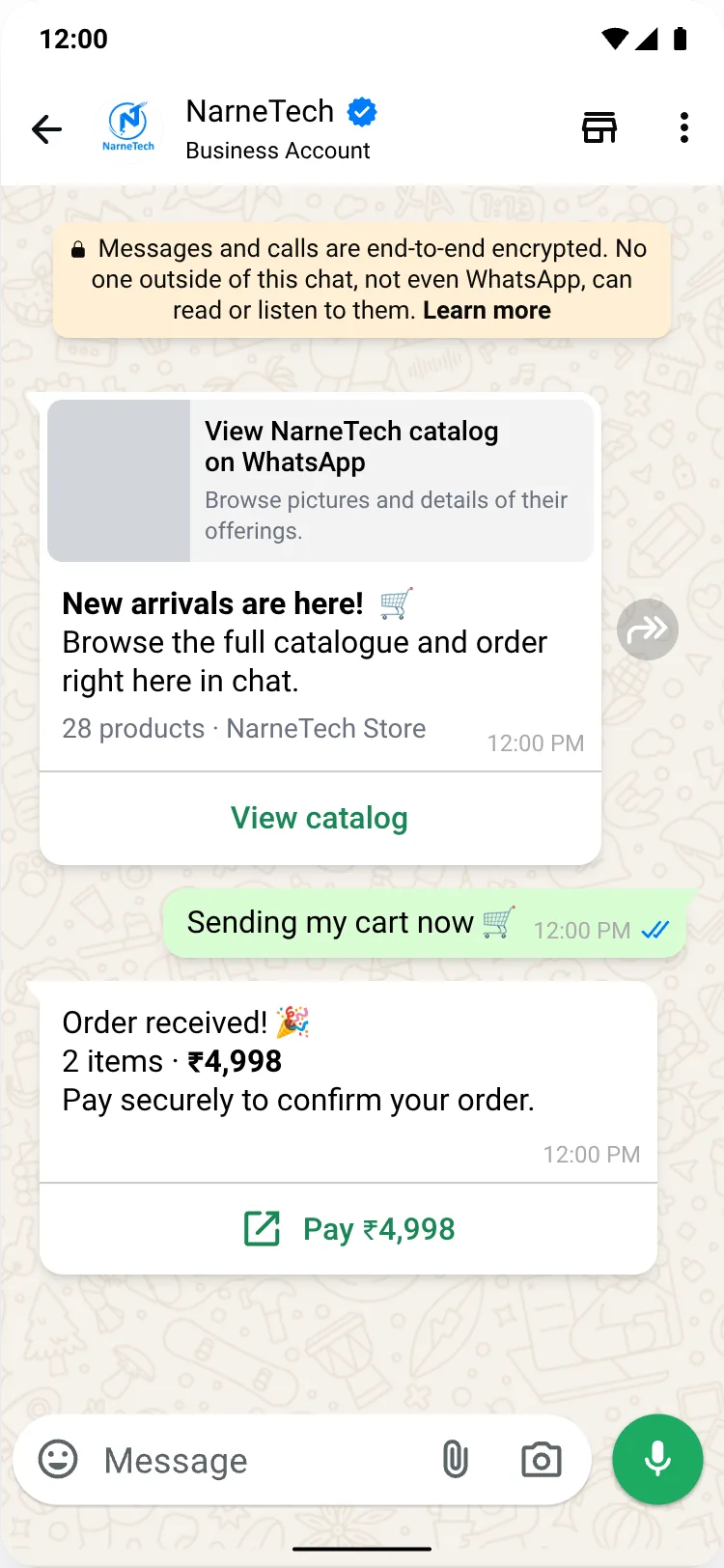
WhatsApp catalogue conversation — customer views the NarneTech catalog, sends a cart and gets a Pay ₹4,998 button in the chat
Catalogue & in-chat checkout
Customer browses the catalog, sends a cart and pays — without leaving WhatsApp.
WhatsApp AI chatbot conversation — Aadiya 2.0 answers two customer questions, then offers full pricing or a human agent
AI chatbot
Aadiya 2.0 answers from your own documents, with a talk-to-a-human handoff.
WhatsApp broadcast campaign — promotional offer with Shop now, Talk to sales and Stop promotions buttons, followed by plan details
Broadcast campaigns
An offer lands with Shop now / Talk to sales buttons — and the reply is handled too.
WhatsApp auto reply conversation — a Hi triggers an away message, a View options list menu and a pricing reply
Auto replies
Away message, list menu and an instant pricing answer — no human needed.
WhatsApp order alerts — order confirmation with Track order and View invoice buttons, out-for-delivery update and a Pay now reminder
Order & payment alerts
Order confirmed, out for delivery, and a payment reminder with a pay-now button.
WhatsApp Flows conversation — a View Flow form card collects a booking and the chat confirms it instantly
WhatsApp Flows
A booking form opens inside the chat and confirms on the spot.
WhatsApp authentication conversation — one-time passcode with a Copy code button, a login alert and two reply buttons
OTP & login codes
Copy-code OTP template, a login alert and quick reply buttons.
A DAY IN THE LIFE

What a WhatsApp-first day actually looks like

09:10
Overnight questions are already answered

The AI assistant handled 34 conversations while you slept — order status, shipping timelines, return policy — each answered from your own uploaded documents, with three low-confidence chats queued for a human.

11:30
New stock goes out to the right segment

You pick the 'repeat buyers · Hyderabad' segment, the wallet shows an estimated ₹2,140, and the campaign dispatches at your number's safe throughput instead of all at once.

13:45
Replies land in one shared inbox

Six agents work the same number. Conversations are assigned, labelled and noted, and every chat shows how much of the 24-hour service window is left.

17:00
Automation does the follow-up

Customers who tapped the catalogue but didn't order enter a wait-then-nudge flow. Anyone who replies STOP is opted out automatically and excluded from every future send.

19:20
You see what it actually cost

Delivered, read and replied counts for the campaign, plus the wallet ledger: reserved, captured on delivery, and released for the 38 messages that failed.

MESSAGE TEMPLATES

The kinds of messages businesses send

Write your template in the builder, add a sample for each placeholder, and submit it to Meta for approval. NaWaBiz tracks its status and tells you the moment it moves.

MARKETING
“🪔 Diwali offer: flat 25% off till Sunday. Reply SHOP for your code.”
UTILITY
“Order #10482 shipped today and arrives Thursday. Track it here.”
UTILITY
“Reminder: your appointment with Dr. Rao is tomorrow at 11:00 AM.”
AUTHENTICATION
“1024 is your NaWaBiz login code. It expires in 10 minutes.”

Ready to grow on WhatsApp?

Join businesses using NaWaBiz to broadcast, automate and support customers on the channel they check first. Get started in minutes — keep your number, keep your app.

Start free Talk to us